
Marketing ROI for Contractors
How to Track Which Channels Are Actually Working (Using QBO and Your FSM)
If you're running an HVAC, plumbing, or electrical business between $1M and $10M, you're probably spending somewhere between $50,000 and $500,000 a year on marketing. Google Ads, Local Service Ads, Angi, Facebook, direct mail, SEO, and more; the channels stack up fast.
One of our clients spent $100,000 in a single quarter. When asked which channel was performing, the answer was: "Google, I think."
If your marketing agency isn't showing this information to you, then your bookkeeping can save the day!
The data to answer this question exists in your business right now. The problem is that it lives in two places. Your costs are in QuickBooks Online, and your revenue attribution is in your Field Service Management (FSM) software. Until someone connects them, you're guessing.
Here's exactly how to stop guessing.
Step 1: Set Up Your QBO Chart of Accounts by Channel
The most common thing we see in contractor books is a single line item labeled "Advertising" or "Marketing". Every dollar from every channel stacked into one number. That account tells you what you spent. It tells you nothing about where it went or what came back.
The fix is a five-minute chart of accounts change. Under your main Marketing & Advertising expense account, create a sub-account for each channel:
6201 · Google Ads
6202 · Local Service Ads (LSA)
6203 · Facebook / Meta Ads
6204 · Angi / HomeAdvisor
6205 · Direct Mail
6206 · Sponsorships & Other
62xx · Continue populating all the channels you have
From that point forward, every marketing invoice and credit card charge gets coded to the specific channel and not the parent account. Pull your P&L any month and you can see spend by channel in under 60 seconds. That's the cost side. Now you need the revenue side.
Step 2: Tag Lead Sources in Your FSM
Your FSM is where the revenue lives and every major platform has a way to connect that revenue back to the source. The setup varies by system.
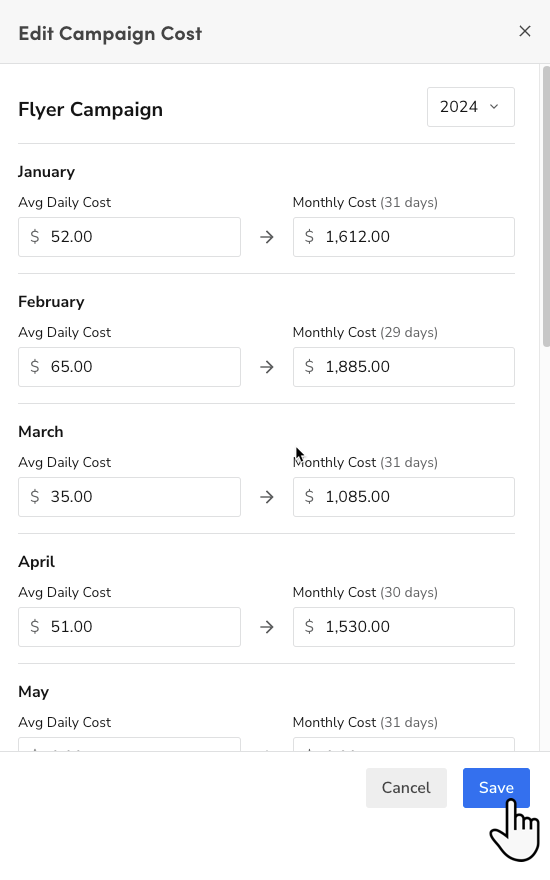
ServiceTitan: The cleanest native option available. ServiceTitan's Marketing Pro add-on assigns a unique phone number to each marketing channel. When a customer calls from a Google Ad, the call is automatically tagged, and the revenue from that job flows back to the campaign without manual input. If you're on ServiceTitan and spending meaningful money on marketing, Marketing Pro is worth the investment. Here's the help documentation on ServiceTitan marketing pro: https://help.servicetitan.com/docs/assign-tracking-phone-numbers-to-marketing-pro-campaigns
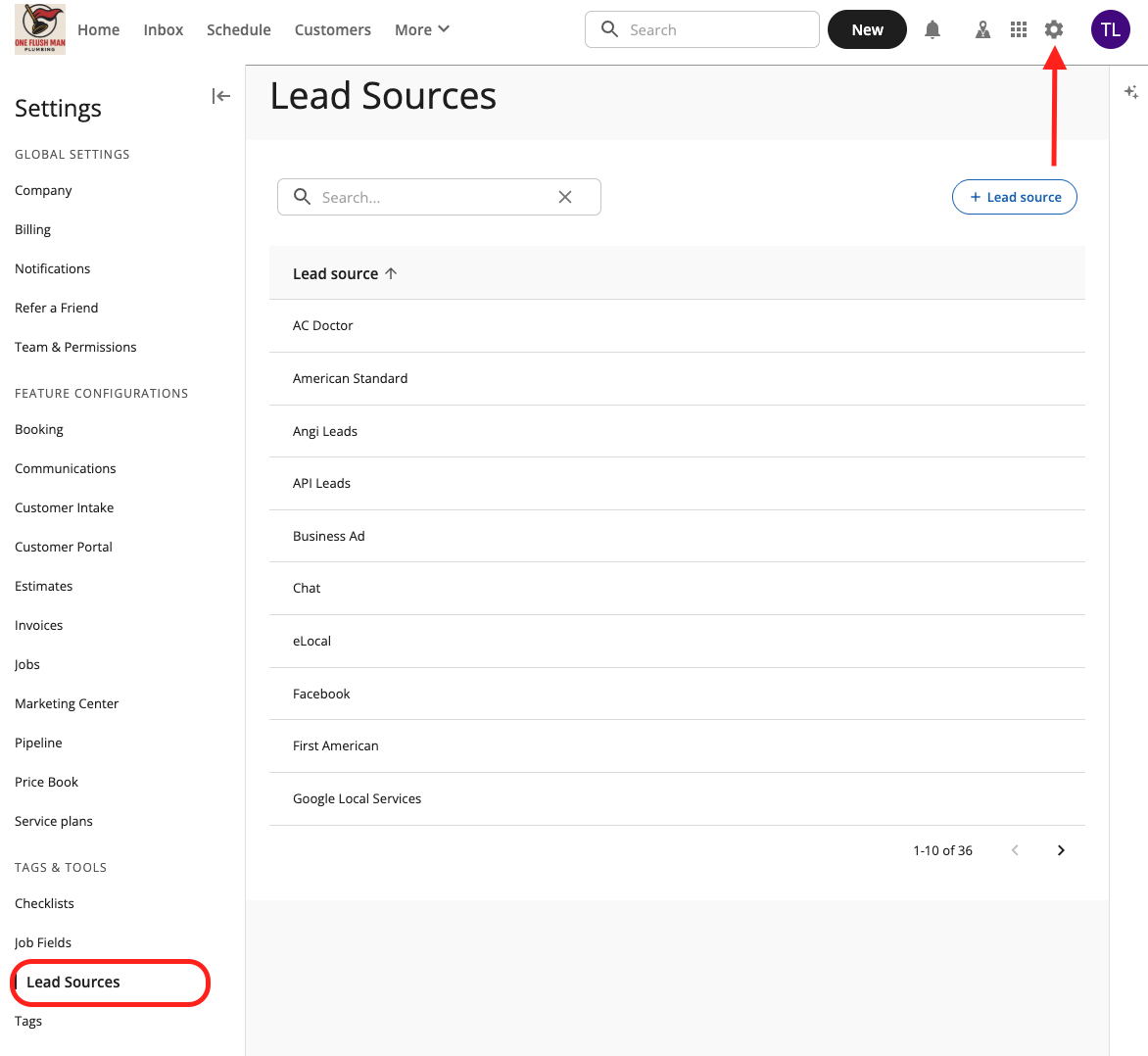
Housecall Pro: HCP has lead source tracking built into every job and customer record. Create custom lead sources to match your channels, such Google Ads, LSA, Facebook, Angi, and tag each job at booking. HCP's reporting then shows revenue by source. For phone attribution specifically, integrating CallRail assigns a unique number to each channel and pushes the tag into HCP automatically, which removes the manual step for phone leads. Here's the lead source setup in HCP: https://help.housecallpro.com/en/articles/5434315-how-to-use-lead-sources
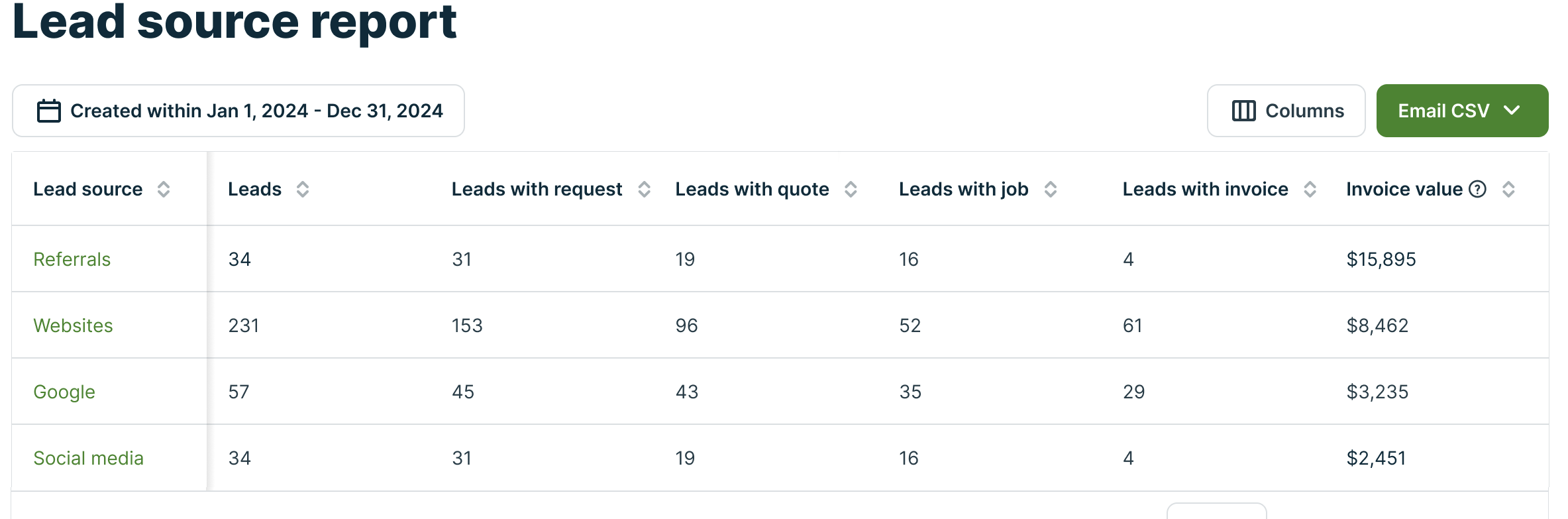
Jobber: Jobber's Lead Source Report ties revenue to source the same way. Set up your sources, tag jobs at booking, and pull the report monthly. Jobber doesn't have native call tracking, so CallRail fills that gap. Again this may be useful because phone leads typically represent 60 to 80 percent of inbound volume for trades contractors.
Here's the lead source setup and reporting in Jobber: https://help.getjobber.com/hc/en-us/sections/115002590568-Client-Management
No auto-tagging available: Your fallback for any system is a CSR process. Every call, your office staff asks "How did you hear about us?" and tags the job before it's saved. Make the lead source field required (most FSMs allow this) so no job can be created without attribution attached. Done consistently, this captures 80 to 90 percent of your lead source data accurately.
Step 3: Calculate ROI Monthly
With spend in QBO and attributed revenue in your FSM, the math is straightforward.
Marketing ROI =
(Revenue Attributed to Channel - Spend on Channel)
÷
Spend on Channel × 100
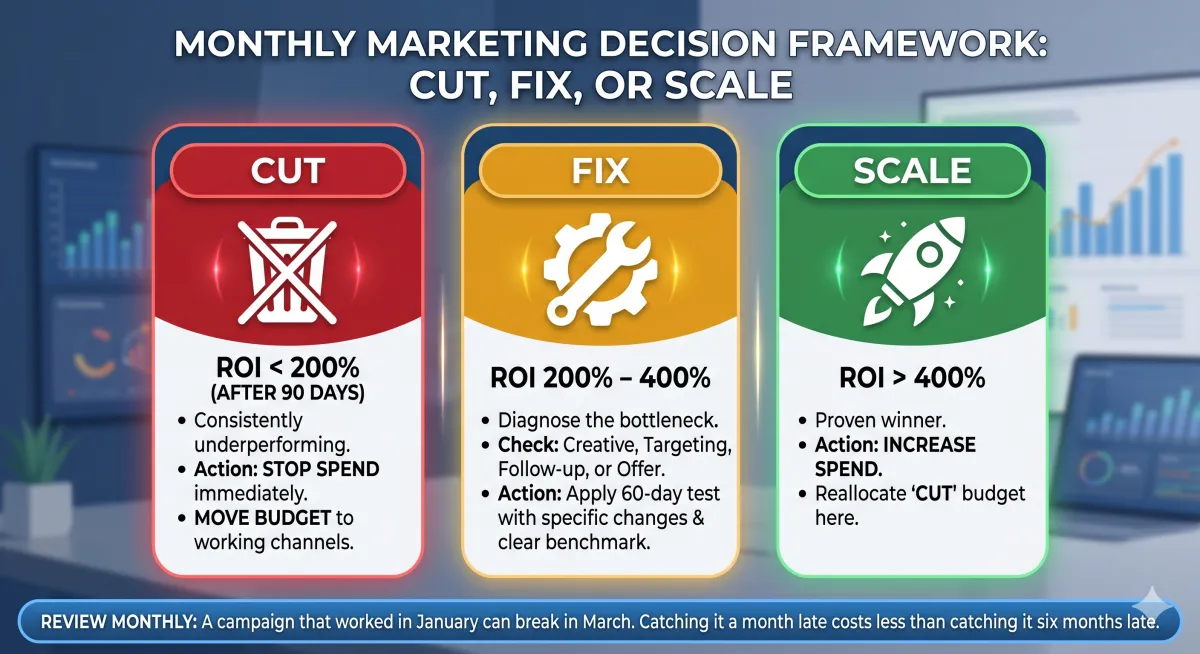
The benchmark we use for trades contractors: 400% minimum per channel. For every dollar spent, you want five back. Below 400% warrants scrutiny. Below 200% consistently means something needs to change.
Here's what this looks like with real numbers from a single month:
Google Ads (ROI: 475%)
Spend: $3,200
Revenue: $18,400
Local Service Ads (ROI: 689%)
Spend: $1,800
Revenue: $14,200
Angi (ROI: 110%)
Spend: $1,000
Revenue: $2,100
Direct Mail (ROI: 100%)
Spend: $800
Revenue: $1,600
Two channels well above threshold. Two that need review and changes.
Step 4: Make the Monthly Decision
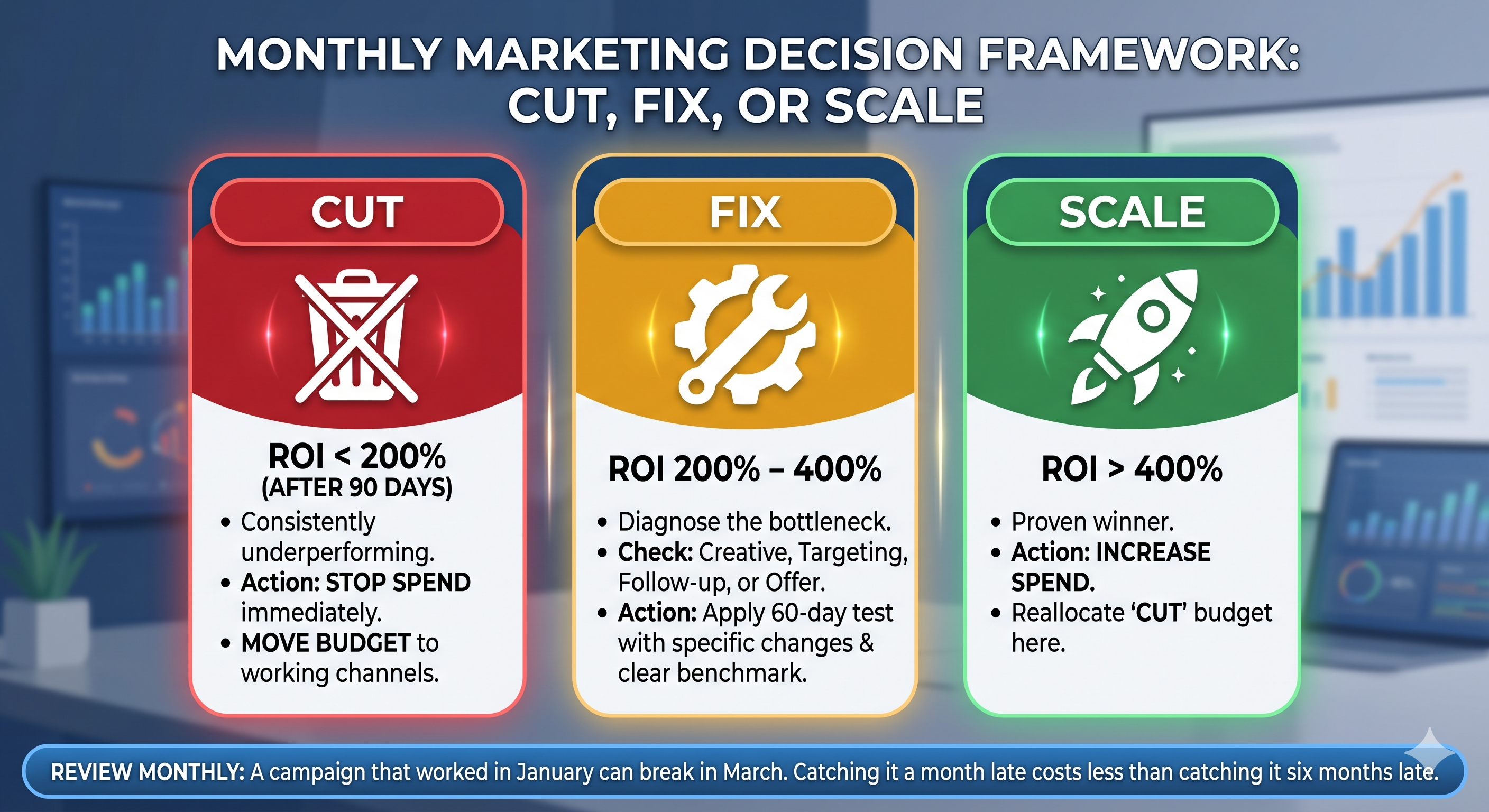
Once you have the data, there are three moves:
Cut channels that are consistently below 200% ROI after 90 days. Move the budget somewhere it's working.
Fix channels sitting between 200–400%. They're not dead, but something is underperforming whether that's creative, targeting, follow-up, or offer. Give them 60 days with a specific change and a clear benchmark to hit.
Scale channels above 400%. That's where the cut budget goes. More spend on what's working is the entire point of this exercise.
Review this monthly. A campaign that worked in January can break in March. Catching it a month late costs less than catching it six months late.
What Happens When You Actually Do This
The client who spent $100,000 in Q1 ran this analysis for the first time after we set up their QBO sub-accounts and confirmed their FSM tagging was accurate. Angi hadn't crossed 200% ROI in four consecutive months. Direct mail was generating brand awareness but no attributable revenue. They cut both, shifted the budget to LSA and Google, and reduced total marketing spend by 15% while increasing attributed revenue 22% the following quarter.
The money was always there. It just needed the right accounts to surface it.
Advanced Metrics
For those who are comfortable with their ROI per channel, there are additional marketing metrics that we won't dive into in depth here; however, I'll leave you with a solid next step.
Cost Per Acquired Customer is the next number worth tracking. Divide channel spend by new customers generated from that channel. If Google Ads brought in 14 new customers at $3,200, your CPA is $228. Stack that against your average job value and customer lifetime value to know whether that acquisition cost is sustainable.
The Bottom Line
Your QBO already tracks every dollar you spend on marketing. Your FSM already tracks every dollar of revenue those campaigns generate. The only missing piece is the connection between them which boils down to a clean chart of accounts on one side and consistent lead source tagging on the other.
Set it up once. Review it monthly. And stop guessing which channel is working.
If you want to see how this would look in your specific QBO setup, we're happy to take a look. https://meet.acc4t.com/discovery