
Accounts Payable in QuickBooks for Contractors
Accounts Payable in QuickBooks for Contractors: Entering & Paying Vendor Bills the Right Way
There's a mistake we find in almost every contractor's QuickBooks file the first time we open it. It's a quiet one; nothing throws an error, nothing turns red. But it makes the owner look like they spent thousands of dollars they didn't, or hides thousands they did.
It all comes down to one thing most contractors treat as boring data entry: how you enter and pay your vendor bills.
We do bookkeeping for HVAC, plumbing, and electrical contractors, and that's all we do. So we see the same accounts payable mistakes over and over, from Ferguson statements to Johnstone invoices to the random Home Depot run. Below are the four that cost the most, how to spot each one in your own books, and how to fix them.
Why accounts payable isn't just data entry
Entering and paying vendor bills isn't busywork. Done right, it gives you three things you can't run a trades business without:
You always know exactly what you owe.
Your profit number is actually true.
You've laid the track for job costing
Done wrong? All three break. So before the leaks, one quick foundation.
Bill vs. expense: the distinction everything hangs on
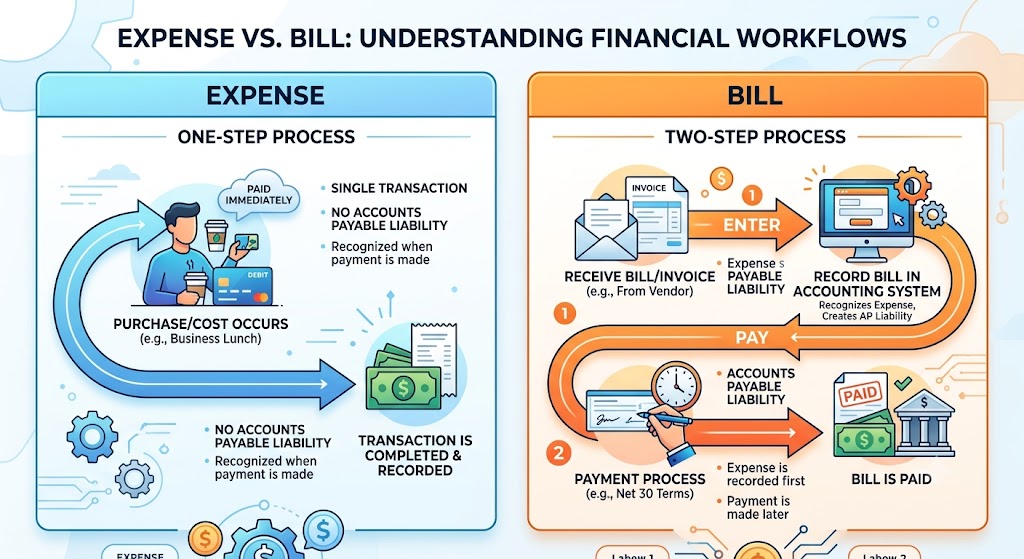
In QuickBooks there are two ways money leaves your business, and they are not the same thing.
If you pay a vendor on the spot, like a card swipe at the supply house counter, that's an Expense or a Check. The money's gone, you record it once, you're done.
If a vendor gives you terms ("pay me by the 30th"), that's a Bill. You owe it, and a bill is a two-step process:
First you Enter the Bill so QuickBooks knows you owe it
Then later you Pay Bills when the money actually goes out.
That two-step workflow is exactly where contractors get into trouble.
Leak #1: The double-count
This is the most common and most expensive mistake we see, and almost nobody knows they're doing it.
Here's the scene. You enter a bill from Ferguson. QuickBooks now knows you owe $4,000. You pay it. Then a few days later you're cleaning up your bank feed, you see that $4,000 leave checking, and you click "Add".
That's the leak. You just told QuickBooks you spent that money twice: once as the bill and once as the bank-feed transaction. Now your materials cost is double what it actually was, your P&L is wrong, and if that flows into your taxes, you're filing on bad numbers.
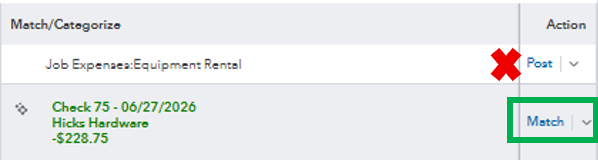
The fix: when you use the bill workflow, that payment in the bank feed should never be Added — it should be Matched. QuickBooks already knows about the payment because you created it when you hit Pay Bills, so the feed will offer you a match. Click Match and the cost lands in your books exactly once.
Add makes a new transaction. Match connects to one that already exists.
Add is the leak. Match is the fix.
But wouldn't reconciliation catch this? Usually, no. When you "Add" that payment, it clears against the real money that left your bank, so your reconciliation still balances to zero and looks perfectly clean. The duplicate you created, the original bill payment, just sits there uncleared, forever, in a pile nobody reviews unless you're routinely reconciling your A/P aging.
So reconciling isn't "did it balance to zero." It's "what's sitting uncleared, and why?" That stale pile is where this leak hides. If you've got bill payments from eight months ago still uncleared, that's your sign.
Leak #2: Paying the supply house off the statement
This one is specific to how trades buy materials. Your supply house, whether that's Ferguson, Winsupply, Johnstone, Border States, sends a monthly statement with thirty or forty deliveries on it, spread across a dozen jobs. Most contractors pay the whole statement as one lump, coded to a single "Supplies" line.
When you do that, three things you need disappear:
You can't tie any of that material to the job it went to, so you'll never know what that job actually cost.
You can't catch the supply house overbilling you for the wrong price, double delivery charge, a return that was never credited. It happens more than you'd think.
Your "Materials" number becomes a blob that tells you nothing.
The fix: enter bills the way the material actually arrived, one bill per invoice, not one lump per statement. That's more work, and if you're doing forty deliveries a month you shouldn't be hand-keying every one; that's what a tool like Dext or your supply house's own export is for. Either way, the principle holds: detail in, or you get nothing useful out.
Leak #3: No job on the bill
This is the big one, because it's the difference between running a real trades business and running a checkbook.
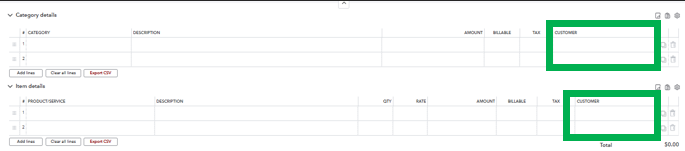
Every bill in QuickBooks has a column most contractors ignore: the Customer/Project column. When $4,000 of Ferguson pipe goes in with no job attached, QuickBooks has no idea which job ate that cost and job costing is dead before it starts. You can buy all the reports you want; if the cost wasn't tagged to the job the moment you entered the bill, the report has nothing to show you.
The fix: every material cost and every subcontractor bill that belongs to a job gets the Customer:Job assigned right there on the bill line (and the billable box checked if you re-bill it). Do that consistently and you can finally run a report that says one install made you 38 points and another made you 11 and actually do something about it.
This is the on-ramp to real job costing. There are deeper levels to costing, but none of them work if the bill isn't tagged. This is rung one.
A note for ServiceTitan users: everything above about hand-tagging the job on the bill is the QuickBooks-native way. If you're running ServiceTitan, don't do your job costing in QuickBooks. In ServiceTitan your purchase orders are already tied to the job, so when you receive and bill against them in the Payables tab, the cost lands on the job automatically and the financial summary syncs down to QuickBooks. QuickBooks is your books; ServiceTitan is your job costing. Let the system you already pay for do the work.
Leak #4: No A/P aging — flying blind on cash
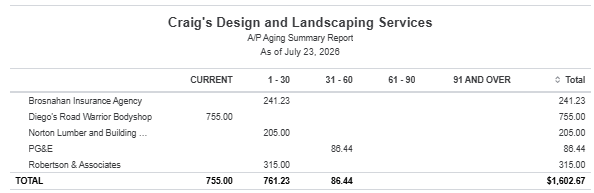
This is the one that turns into a 2 a.m. "do I have enough in the account" panic. If you pay every vendor the second the money's available, straight from the bank feed with no bills entered, you've thrown away one of the most useful reports in QuickBooks: the A/P Aging Summary.
When you actually enter your bills, that report tells you in one glance what you owe and when it's due. So you stop getting surprised by cash crunches, you stop missing early-pay discounts, and you can time payments on purpose instead of paying everything the day it lands.
The fix: anything you don't pay on the spot, enter as a bill. Then run the A/P Aging Summary every Monday. Two minutes. It's your cash flow early-warning system.
"Is it worth the extra typing?"
Every contractor thinks it: this is more data entry, and you're busy. Fair. Beyond the accuracy, job costing, and cash flow we already covered, here's what makes it worth it.
You catch yourself paying the same bill twice. Paid it on the card and off the statement, or paid an invoice that was already on last month's statement. The supply house is not going to call and tell you that you overpaid so that catch has to come from your side, and entering bills is what gives you the checkpoint.
It's where you enforce W9s. No W9, no check. If the rule is that a sub doesn't get paid until his W9 is on file, accounts payable is the chokepoint where you hold that line instead of chasing him down in January when he's ghosting you and you're trying to file 1099s. The ball is in your court to collect it before you pay him; AP is how you keep it there.
It makes you look like a real company. When you go for a line of credit or a bond as you grow, the lender wants to see a real A/P aging. Proof you're not quietly buried in payables. Clean books are the signal, and it starts here.
The bottom line
Vendor bills feel like the most boring thing in your business. But how you enter and pay them decides whether you know what you owe, whether your profit number is honest, and whether you can ever see what a job actually made you. Get accounts payable right and everything downstream gets easier. Get it wrong and every number you look at is a little bit of a lie.
FAQ
Should I use Add or Match in the QuickBooks bank feed?
Always "MATCH" bill payments in the QBO bank feed to avoid duplicates and old unpaid bills.
What's the difference between a bill and an expense in QuickBooks?
An expense or check is a money gone from the account at time of purchase. A bill is an amount you owe but have not yet paid.
Do I need to enter bills if I pay everything immediately?
Technically no. However, we would urge you to leverage bills especially at least with vendors and subs to extend and improve your business's cash flow. The rule of thumb is to keep cash in YOUR business by collecting from customers quickly and paying vendors as slow as possible within the terms they provide.
Should I job cost in QuickBooks or ServiceTitan?
If you're already paying for ServiceTitan, it's a much better platform for job costing so we recommend it over QuickBooks job costing through customers or projects which ends up being much more manual with lower quality reporting capabilities.
Not sure whether your books have these leaks?
Book a free 30-min call and bring your QBO file. We'll peek over your shoulder and help ensure everything inside of your books is up to par so that you can be confident in the numbers they're providing. Grab a slot that works for you here: https://meet.acc4t.com/discovery
Too busy? We built a suite of tools exactly for this. Download the Cash Flow Leak Scorecard. It walks you through the spots where money quietly leaks out of a trades business, accounts payable included. Worst case, you confirm your books are clean. Best case, you catch something that's been costing you for months. Available on our site here: https://acc4t.com/resource-5908